Banner
Showing posts with label iPad. Show all posts

Tuesday, March 12, 2013

How to Transfer Apps from iPhone to iPad

Transfer apps from iPhone to iPad

If you own both iPhone and iPad, you will find it difficult to use the iPhone apps directly on iPad. But there are a large amount of universal apps that can be used in iPhone and iPad, and you don't want to purchase same apps again for iPad. Now we will share with you the steps to transfer apps from iPhone to iPad using iTunes.

Tips: In order to save troubles on transferring apps, you had better firstly purchase and download iOS apps on iTunes, then load them to your iPhone and iPad.

Step 1: Connect iPhone to PC via USB cable, and iTunes will automatically run and detect your iPhone.

Step 2: Sync iPhone apps. Click on your iPhone name appearing under "Devices", then click the "Sync" button in the lower-right corner. Therefore, all apps from iPhone will be synced to the iTunes application library. Of course, you can also do as follow: click on "File", scroll down to "Sync iPhone".

Step 3: Remove your iPhone from PC, connect iPad onto PC with USB cable, and iTunes will recognize your iPad soon!

Step 4: Double-click on the icon of your iPad, and select "App" tab on the top of the iTunes main interface, and then apps from iTunes library will show up. Just click the check boxes of apps that you wish to transfer to iPad. Click "Apply" and "Sync" on the lower-right corner, then apps from iPhone will be transferred onto iPad!


Note: Those above steps are easy and also suitable for transferring digital content purchased from iTunes. But the downloaded music, video and photos from internet are prohibited to transfer via iTunes, and it is advised to use a third party utility like Leawo iTransfer. Leawo iTransfer allows transferring apps, music, video, photos and eBooks between iPhone, iPad and PC without iTunes.

Transfer apps and other files between iPhone, iPad and PC

Now the following will simply show you how to transfer apps from iPhone to iPad. You also can transfer any media files between iOS devices and PC with similar steps. In addition, make sure that iTunes has been installed on PC for the assistance to Leawo iTransfer!

Step 1: Connection. Run Leawo iTransfer; connect iPhone and iPad to computer with USB cable. The Leawo iTransfer will recognize your iOS devices and show on the left side.

Step 2: Choose target files. Click on the name of your iPhone on the left, and choose "App" or other items. The details from iPhone will show up. Now you can select the apps you want to transfer.

Step 3: Start transferring. Through above selections, now you can transfer those apps to iPad, iTunes and PC fast with three ways.
   
Transfer apps  between iPhone, iPad and PC

1: Directly drag-and-drop the apps from iPhone to iPad; 
2: Right-click those apps to choose "Transfer to" and click "iPad" option;  
3: Click the Transfer button in the lower-right corner and choose "iPad" from "Transfer to list" as the transferring destination in the pop-up window.

 More iOS tips:

How to Transfer Videos and Music from iPhone 5 to Computer
How to Copy Music from iPod to PC for Free 
iPhone 5 Tips: How to Watch DVD on iPhone 5
Best Easter 2013 iPhone and iPad Apps for Kids 


Friday, November 9, 2012

iPhone and iPad Tips: Top Free Must-have Utilities for iPhone 5 and iPad mini


Life of every iPhone and iPad user has been influenced by those iOS devices more or less! The App Store offer users much fun and convenience with its apps! In order to have fun with or take full use of iPhone and iPad, we should own some necessary or useful app or software for our iOS devices! However, it is difficult to find out these kinds of utilities especially those free ones online! Now we have rounded up some awesome and simple-to-use free utilities for iPhone and iPad from the Internet for your reference, wishing to help you save time and trouble!

Find My iPhone

All users of iPhone, iPad and iPod touch should install it into their devices! As we all know, it is developed and suggested by Apple. All of us are likely to lose our iPhone or iPad. If it happened, we would want to know where they are and were certainly worried about the safety of our data. So this is what Find My iPhone are designed for. We can find out where our iPhone or iPad are on the map by installing this app in another iOS device. What’s more, we can remotely lock our lost devices or even delete our data.

Find my iPhone - utility of  iPhone and iPad


Any smartphone and tablet swallow a great amount of network data, and so do iPhone and iPad! Naturally, we should get something to help us to find out free Wi-Fi Internet hotspots. This Free Wi-Fi Finder can search out Over 145,000 Free locations using your iPhone’s GPS. We can search by “near me”, geographic regions and location type (Cafe, Library, etc.). Of course, it is free version; another paid version will offer us more amazing functions!

free Wi-Fi Finder


Different from Android devices, our iOS devices can’t show as a readable disk on computer. If we want to transfer files between iPhone, iPad and PC, we have to use iTunes. However, our disappointment to iTunes is that we are not allowed to transfer movies, music and photos from iPhone to computer, especially those music and photos downloaded from website or friends! So that is why we mention Leawo iTransfer here. The iTransfer is a great alternative to iTunes and can help us to make up the disadvantage of iTunes. It can transfer not only movies, music and photos but also PDF files, apps and eBooks between iOS devices and PC! 

In addition, great news is that the iTransfer is free as a giveaway on November 12, 2012 limited! Even though the developer often carries free giveaway activities for Leawo iTransfer, this time is different before and anyone can get great discount on other iPhone and iPad converters from now on to November 22.

Leawo iTransfer - free data transfering tool


If we save some important information that we don’t want others to have access to in our iPhone, iPad and Mac, This kind of app is what we should own! Keeper stores our passwords and private information with a simple but military-grade encryption way. We can back up online and Syncs to All Your Devices. With Keeper, we can access our private info anywhere and anytime and securely protect important data from Hackers and rogue programs! Of course, you may find more paid safety app on the market!

Keeper - free app for iPhone and iPad

Battery Doctor

The battery life is one of key features that we concern for mobile smart devices! Any new battery can only power our iPhone, iPad or other devices in 2 years at most. Apart from knowing some tips to saving battery life, it is great choice to install Battery Doctor for our iPhone and iPad. It can help us get real-time power consumption rankings, shut down those applications which consume phone power and battery life will be more lasting.

free app - battery life

The Weather Channel

In last blog we suggest the Living Earth among top traveling apps. Similar to Living Earth, the Weather Channel can offer us real-time weather information worldwide. Based on the support of 200+ meteorologists, along with its patented ultra-local TruPoint(sm) weather technology, it provides us with full screen, customizable weather maps and allows us to plan our day, week, or even the next hour with the great weather tool!


Thursday, November 8, 2012

Top iPhone and iPad Traveling apps We Can't Miss


Traveling means a great holiday for those who love nature and life, but is ordinary for those businessmen! Whatever, travel involves traffic, weather, accommodation, daily diet and even scene sighting! Nowadays there are a lot of mobile apps available for our phones and tablets. Some of great apps actually help much people save time and trouble in those places far from home! Today let’s share some great and necessary iOS traveling apps for those iPhone 5 and iPad mini users out out of home!
 
Flight+

This iOS app can help you track all flights worldwide in real-time and display them all in one unique interface. You can track detailed real-time flight info,no matter departure and arrival time, information about gate,airline,airport and aircraft. What’ more, its alert can help remember every flight you concern. In other words, with the help of this app, you won’t miss any your flight  and sometimes receive your friends at the airport in time! It has free and paid version for iPhone and iPad! Its paid version will certainly give you more wonderful services!

Living Earth- clock&Weather


It is a most beautiful and stunning clock and weather apps! it features HD live 3D simulation of our planet. You can get real-time global weather map, forecasts and world clock for cities around the world, and track hurricanes and tropical storms. It is optimized for the Retina display of iPhone and iPad 4. Last year, it was ever rated as a Top 10 iPhone and iPad app in 2011 by Apple New York Times. during our holiday or business travel, it would be better to install Living Earth into iPhone, iPad even iPod touch!

iPhone app - Living Earth
  
Wi-Fi Finder

when you travel, how to quickly and easily find Wi-Fi will be an important issues since International data rates can be crushing out of your country. Wi-Fi Finder can track over 200,000 both free and paid hotspots in 135 countries, and tell you exactly where the closest Wi-Fi hotspot is and how to get there!

Currency Converter

We need local money when traveling, so it is necessary to know the currency rate! This iPhone and iPad app converts exchange rates for over 180 currencies and 4 metals in a simple interface! And the rates are daily updated based on information supplied by leading market data contributors. But it is more important to know details where you can see buy and sell rates for both currencies. The app also can help you solve this problem!

currency converter

SpeechTrans French English Translator with Voice Recognition

It is impossible to know all main languages worldwide. But we can communicate with those people whose mother language is different from yours with the help of translator app! We all know the free Google translator but most of time it is full of grammar mistakes! This French English Translator can translate out what you need! It supports Text to Speech translations and record function for your voice! BTW, it is fast and accurate!

Translator - iPhone app

Google Earth

Wherever we go, it is better to own a navigation app or device in hand in case of losing way!Undoubted, Google Earth is the most amazing Nav app worldwide. Based on its up-to-date Map data , you can browse layers including roads, borders, places, photos and more in almost any place around the world! Its new service “tour guide” even helps you easily discover exciting new places to explore.

Google earth

Hotels.com

Everyone on the way need accommodation! If you don’t camp and have no friends in a new place, finding a hotel will be a key thing when you are traveling. This iPhone and iPad app is developed by Hotels.com. With this app, you can search and book 150,000+ hotels throughout 200 countries, and even get lots of last minute deals in the new feature ”Tonight’s Local Deals”. In addition, all bookings made on the Hotels.com app will count towards your WelcomeRewards account, and you will be rewarded for one free night after booking 10!

Hotels.com - iPhone and iPad app

Yelp

If you go to a new city even in your home city, you sometime feel trouble to find some restaurants especially those popular and special food! Now with Yelp, you can easily search out places to eat,drink, shop and rest! The new version of Yelp not only help find nearby bars, restaurants, cafes and more, but also allow you to find great Deals, browse a restaurant's menu along with photos and reviews, and even make reservations! It is a necessary partner for your iPhone and iPad when we travel out of home!


Urbanspoon

This is another great app searching for food! Just shake your iPhone and the Urbanspoon slot machine will suggest a restaurant and you can follow GPS to get there! Of course, like Yelp, you can find out great new places to eat. And make a RESERVATION.

Yelp - iPhone app


Of course, these are basic and necessary apps for users of iOS devices around the world. When you travel to some place, you still can find out more local and detailed apps for your iPhone and iPad!

Wednesday, October 24, 2012

iPad Mini VS Google Nexus 7 VS Amazon Kindle Fire HD – Which is the Best 7-inch Tablet?

Apple's iPad mini

With the introduction of the iPad Mini Tuesday, Apple hastens its goal of getting its products in every consumer's hands and also leaves buyers of small tablets with more choices. To dominate larger tablet market and fight its rivals down, the 7.9-inch iPad Mini retails for as low as $329 and is thinner and lighter, even adding 4G support. While, it is too soon to say that the iPad mini could win the tablet war as the previous iPad. As we know, several 7-inch Android-based tablets are so hot and have already occupied the market in advance, such as Google's Nexus 7, Amazon Kindle Fire HD and Barnes & Noble's Nook HD. If you want to pick up a 7-inch tablet for pocket, which one you would pay your money for? Let's continue the discussion from specs and services to compare iPad Mini, Nexus 7 and Amazon Kindle Fire HD.


specs - iPad mini vs Nexus 7 vs Amazon Kindle Fire HD


Review based and beyond the specs
The iPad mini will go on sale on the Nov.2, and Apple will accept orders from the Oct. 26. But both the Google Nexus 7 and the 7-inch Kindle Fire HD are already on sale. It is very obvious that Apple iPad Mini is relatively expensive than the other 7-inch tablets those all starts the price at $199. Will customers of small tablets leave iPad Mini away concerning about the price? No! Certainly existing Apple fans will gravitate toward it. What iPad Mini brings to users is also perfect experience!

Even though the screen resolution of iPad Mini lacks Apple's crystal clarity and is lower than its rivals, it is even more prominent with the same 1024-by-768 resolution as iPad 2. Because that iPad Mini reduces the width of the bezels on two sides of the display and rethink the software behind it to make sure giving you the maximum amount of screen in the minimum amount of space. In addition, the entire package of iPad Mini weighs a slight 308 grams - making it lighter than its rivals.

The iPad Mini's A5 dual-core processor running at 1GHz could easily fall to the Nexus 7's quad-core CPU. Of course, but we can't deny that Apple's A5 is powerful and power-efficient which makes everything you do feel smooth and natural. And without testing we still don't know how performance stacks up.

What should be mentioned is that iPad Mini offers a cellular option of 4G LTE connectivity. In other words, without access to Wi-Fi, you can enjoy the ultrafast cellular network connections around the world — including LTE7 and other advanced wireless networks such as HSPA, HSPA+, and DC-HSDPA. It is a great advantage comparing Nexus 7 and Amazon Kindle Fire HD, and will certainly help flood the market.

iPad mini vs Nexus 7 vs Kindle Fire HD

It is still hard to say which wins. After all, there are different demands for each product and the lower price of Nexus 7 and Kindle Fire HD. Furthermore, the Nexus 7 and Kindle Fire HD already target slightly different audiences from the beginning. The former lures gamers, multimedia enthusiasts, and Android fans looking for the "pure" Jelly Bean experience. The Fire HD is a steal for Amazon Prime members looking to maximize their Amazon membership while keeping tablet costs low, memory high, and the screen mighty.

Related blogs:

iPad 4 VS iPad 3: How Does iPad 4 Replace Its Brother iPad 3?
Microsoft Surface RT VS iPad 3: Another Cruel War in the Tablet Maket 
Amazon Kindle Fire HD VS Google Nexus 7: Which Is Your Own Taste?


Tuesday, October 23, 2012

iPad 4 VS iPad 3: How Does iPad 4 Replace Its Brother iPad 3?

Apple' s iPad 4


iPad Mini is really arrive, but as a little surprise, Apple also launched the fourth-generation iPad called "iPad with Retina display". Breaking their traditional annual product cycles and with the new ipad 3 hitting the market just in March of this year, the unveiling of the iPad 4 makes users of its old brother peeved. However, will the iPad 4 completely replace the new ipad 3 from now on and won't iPad 3 be worth your money? Here we are going to find the answer by comparing the key spec of both ipad. 

iPad 4 VS iPad 3

Display

The iPad 4 comes with the familiar 2048-by-1536 pixel resolution and 9.7-inch Apple Retina display. Unlike the iPhone 5's 326ppi, Both the new iPad 3 and the iPad 4 feature with the same 264ppi Retina display,which is strong enough to lead the tablet market.in addition, the new device comes in black and white and has no readily noticeable design changes.


CPU

This update of processor will be the main difference between both iPad and the main selling point of the iPad 4.The new iPad 4 ships with the A6X processor, doubling the current CPU and graphics power of the A5X available in the new iPad 3. 

Apple A6X Chip 
OS

Undoubtedly, the iPad 4 is powered by the Apple's latest operating system, iOS 6. Even though the iPad 3 launched with iOS 5.1 but now is also upgradeable to iOS 6.


Price

The fourth-generation tablet starts at $499 with 16GB of storage which is same to iPad 3. As before, $100 will be added to that price for every 16GB in additional storage. The top-of-the-line 64GB iPad with LTE will retail for $829.


Others: Battery life, LTE, Connector

Both iPad have 10 hours of battery life and expanded LTE support, but the iPad 4 has a Wi-Fi plus Cellular version. That means the iPad 4 could be used in the U.K and other places around the world while the iPad 3 couldn't. in addition,the iPad 4 features the new 8-pin Lightning connector which was first announced on the iPhone 5 and is 80 percent smaller and more durable than iPad 3's original 30-pin one.

Based on the above specs, we can find out the the iPad 4 is just one little updated version of iPad 3 and most specs and price of both iPad are same. So the owners of iPad 3 don't need to complain to the Apple and their iPad 3 are still latest and greatest!

Apple's fourth-generation iPad will be available for pre-order on Friday. The Wi-Fi-only model will be available on November 2. The version equipped with LTE will come into market a couple more weeks later.

 Related articles:

iPad Mini VS Google Nexus 7 VS Amazon Kindle Fire HD – Which is the Best 7-inch Tablet?
Microsoft Surface RT VS iPad 3: Another Cruel War in the Tablet Maket


Tuesday, October 9, 2012

Halloween Ideas: Getting Top Free Halloween Apps for iPhone and iPad


The Halloween is around the corner and now the atmosphere filled with pumpkins, skeletons, horror movies and other scary things is spread across the houses, stores and web sites. Are you ready for this awesome day and have you got any Halloween ideas? Just Get into the Halloween spirit with these iPhone apps. These apps will help you find much fun and the best ideas such as the best costumes and haunted houses.


With this free Halloween app, great collection of high quality Halloween images will be offered to you and you can decorate your iPhone 5 and iPad nicely now. In addition, you can say goodbye to slow-loading problem and don’t need to download Halloween Wallpaper one by one. 

Halloween wallpaper


2. Halloween Costumes Fashion Fun 

Do you want to get Halloween costume ideas for yourself and your kids! Here the most impressive costumes app, Halloween Costumes Fashion Fun, help you get thousands of best Halloween costume ideas. You can email to your friends and check out the screenshots and see for yourself. What is more is that you can buy the costumes from your mobile devices. Halloween Costumes Fashion Fun has separate versions for kids and adults. Just get one for your iPhone and iPad.

Halloween costumes kids


In Halloween City, you can decorate your city with lots of Amazing Halloween Characters including Witches, Vampires, Pumpkins, Monster Plants, Werewolves, Mummies, Zombies etc. and it allows you to try different cross-breeds of the characters. By the way, taking pictures of your city and sharing with your friends are available now. Luckily the newest version has support the iOS 6.

Halloween City


Do you want to know scary sounds to frighten your friends and pick from Hundreds of Halloween costume ideas? It is Halloween time and just put “Halloween!” into your iPhone and iPad. Along with this app, you can download Halloween ringtones, know Halloween trivia, and even get some scary Halloween wallpaper.

Halloween!

Tuesday, September 25, 2012

iOS 6 and iPhone 5 Tips: More Tips for Using iOS 6 and iPhone 5 Better

iPhone 5

The Apple’s brand new operating system, iOS 6, is finally available to download and many Apple fans have got the new iPhone 5 in the palm of their hands . Now it is time to learn new features of iOS 6 and get started to play with your iPhone 5 and other iPhones and iPad. You will find that performance and design of iOS 6 and iPhone 5 are still great and more user-friendly. Here again will tell you some tricks to take advantage of iOS 6 and iPhone, as a supplement for the previous article related to iOS 6 tips.

If your iOS devices are still running the previous iOS, here is the link to show you how to install iOS 6.

1. Do Not Disturb

This is a useful and great feature of iOS 6 to customize your notifications and help you from being disturbed during meeting and other important time. You can completely silence your iPhone and iPad on demand and on a schedule. But you can also make exceptions to be sure that you won’t miss any important phone calls.

How: Settings > Notifications > Do Not Disturb.

2. Reply politely to incoming calls with a text message
 
If an important call comes in and you are not available to answer that, now the iOS 6 offers you a polite way to deal with it. You can reply with a text message instead of declining the call. Of Couse you can also change the default replying texts and edit on your need.

How: Settings > Phone > Reply with Message.

3. Smarter Siri
 
Most of users have heard some new functions with the voice assistant Siri in iOS 6. Siri is now able to launch apps, answer questions about sports, find nearby restaurants and even make reservations, and even provide directions where appropriate. Moreover, you can update your status of Facebook and Twitter.

4. Privacy Settings

What is it and what can it do for you? Generally speaking, if you allow before, you apps can talk to other apps, enter your data, and sharing your information. Sometimes this is what you don’t like. For example, if you don't remember to turn off Facebook, Facebook will tell others where you are. But now you just check the Location Services section of your Privacy buttons, and you can flip the switch off lickety-split.in other words, the new feature helps you quickly turn off any app-to-app sharing that you don't want and you might have forgotten existed. 

How: Settings > Privacy 

You can see which applications have access to personal information, such as location, and turn them on/off them 

5. Panorama Pictures

You maybe have complained that why Apple add Panorama mode behind from Android Devices. But now it comes into the iOS.

How: Move slowly from left-to-right and keep it steady.

Monday, September 3, 2012

Top Free IOS Apps for ESPN College Football Fans

College Football

The college football season is back. if you are super football fans, you are sure to keep you informed with all news, scores and schedules about the college football. Last week there were plenty of free football apps launched or updated on iTunes. Here we will pick some best apps of college football for your reference.

ESPN college football


ESPN College Football
The new ESPN College Football App is all newly designed for your iPad, iPhone and iPod tough to become the perfect companion. This ESPN official app delivers you with the minute breaking news, stats and even video clips. Editorial coverage featuring game previews, recaps, analysis and highlights also comes to your hand easily! You can set score alerts for your favorite teams and any games you hope to watch. In addition, join social networking to discuss with your friends and team fans for example Team by team Twitter content and discussions. The last advantage unique from other similar apps is easy access to live games on WatchESPN. There is no reason not download such a good free app.

WatchESPN
Any more introduction for this app will mean rudundance.it is obvious that this ESPN app for iPad and iPhone can assist you to keep connected to live sports and shows from ESPN, no matter NBA Regular Season and Playoffs, Major League Baseball, The Masters, US Open and The Open Championships, Barclay’s Premier League, Spanish Primera Division and Euro 2012 Soccer, and College Football and Basketball. By the way, please make sure that your TV provider is available.

Team Stream by Bleacher Report


Team Stream by Bleacher Report
The Team Stream by Bleacher Report gives you all of your favorite teams' breaking news across the web as it happens. The Team stream help you to be first to know big news about your loved team. Moreover, more stories for your teams from local newspapers, websites, blogs, Twitter, and Bleacher Report, are always ready for you. This is another great choice other than to keep up with college football.

College Football Scoreboard


College Football Scoreboard
With this free app, latest scores, schedules and news are displayed by conference: ACC, Big 12, Big East, Big Ten, Conference USA, Mountain West, Pac-12 and SEC- plus Top 25 schools. You can Keep track of your favorite teams and your rivals all at a glance. Real time scores are officially licensed from Sports Direct. Of course, Sharing scores and news stories via Facebook, Twitter and Email from within the app is supported. 

If you are interested in these free IOS apps and need more channels to get news of college football 2012, just get them now on iTunes.

Monday, August 13, 2012

2 Tips of 2012 Olympic Memorabilia for Your Phones!

As the London 2012 ends, we have enjoyed a wonderful game show! Even though it closed, we still miss all exciting competitions London 2012 gave, especially the moments our favorite team or sports stars struggle for champion. Yes, we should remember this Olympic Games, or keep on the Olympic spirit in our daily life to encourage ourselves. The best way to achieve this is to keep or make some Olympic Memorabilia with your phones so that you can review this Games whenever!
LONDON 2012 logo

1. Buy Olympic Memorabilia online
Before London 2012 ends, some organizations or factories have made many kinds of Olympic Memorabilia for shopping online, such as toys, cards, water bottles and even pillows and blankets! These are all useful in our daily life, but also can be kept as Olympic souvenirs! How about mobile devices’ accessories? Manufactories will not miss any business opportunity! They have also made some cute and beautiful phone accessories like phone chains and protective coverings. We can buy these collectibles in NBC’ universal store and eBay! 
2012 Olympic phone covering

2. Making 2012 Olympic PowerPoint Slides and DVD 

Moyea ppt to DVD converterIn this 2012 Olympic, The USA defeated Spain 107-100 in the men's basketball final Sunday. As the gap narrows between the U.S. and the rest of the world, it's not as easy for the Americans to dominate every game. Shall we remember these moments for us? We can make some PowerPoint slides or DVD for them. Looking back the whole Games, we have experienced so many this kind of priding games and we should take actions to do something for these athletes and sports fans like us! First, we just pick up some beautiful photos to make a simply PPT, and then we can add some words we want to say for every photo. The whole process is very easy and worthy! if you convert this PPT to video or keep into DVD, it will be shared on YouTube or watch on your TV and iPad/iPhone!

2 Amazing High School Apps for iPad & iPhone

The new semester is coming soon! After a long summer holiday, all students will return to school. But some will still miss the wonderful holiday life and are a little negative about school. What about taking a warming-up for high school life at home? Maybe you will recover the enthusiasm and confidence for school life! So here we will suggest you two mobile apps for high school life!
Surviving High School

Surviving High School
Some of you may have known this game developed by EA, the famous game developer! In Surviving High School, EA imitates the all kinds of lives for you. Similar to real life, every choice you make will determine your fate, such as the parties you will go and the friends you will meet! You can play as a girl or a guy, and will experience the all-new episode every week. Looks like you are in the TV show. Moreover, more ways out of high school to play! Follow the stories and you can go to college, play matchmaker, hit Hawaii for spring break, throw the best party ever, or win the title of Homecoming Queen!
HIGH SCHOOL HERO


High School Hero
Every student has dreamed of becoming a hero in high school. But less of them can achieve it! Now in this High school hero, going to school, getting a part-time job, battling other students in a race and becoming a hero won’t be a dream for you! You will choose from three different character types with their own unique bonuses, play with your friends and make new friends. You also could buy clothes for your avatar to make them stronger, smarter, and more charming; or just to show off your most stylish outfit! At the end of the story, just put your popularity on the line and you will get the chances to become class president, the school mascot, or many other leadership positions. Besides, battling others, and winning leadership positions will help you Earn achievements and earn real world prizes!

Thursday, August 9, 2012

School Supplies: Top Back-To-School Mobile Apps

The summer vocation ends and all students should head back to school. Possibly parents start again to complain that phones or pads take most of their children’ learning time. But the fact is that these mobile devices also can help them study. Now there are many useful mobile school apps for smartphones and pads, and these apps have become the necessary school supplies.
Here are some best Back-To-School apps we should try!
Wikipedia Mobile

Wikipedia Mobile
As we all know, Wikipedia is the free encyclopedia containing more than 20 million articles in 280 languages, and is the most comprehensive and widely used reference work humans have ever compiled. Now many students like to use Wikipedia data as article and research sources. Maybe some parents will worry because Wikipedia’s database of information is in large part curated by amateurs rather than historians. However, Most of the information published in Wikipedia is community-vetted, which is more trustworthy than Google search results. This app can save article to read later or offline, search articles nearby, share articles, read article in a different language, and even full text search and more! So this official Wikipedia mobile should be the first school app for students’ phones and tablets!
Dictionary.com

Dictionary.com
Time Magazine ‘Top 10 Back-To-School App’! Winner: CNET Top 100 Mobile App Award! This app gives you full access to Dictionary.com and Thesaurus.com, even when you're offline. With it, you can get over 2,000,000 definitions, the hot word daily and word origin & history. Besides, it supports Audio pronunciation and Voice search. So just keeps it handy while writing or reading. 
iStudiez Pro

iStudiez Pro
No matter you are students, teachers or parents, this app will be choice for you back to school. It allows any student or teachers to enter his or her schedule with time management. Once your schedule is added, the summary of current classes and tasks is automatically reflected in Today view and even you can get more details like event type, location, time left and so on. It provides Push Alerts when assignments are due, and its GPA calculator helps you track the GPA for current and past semesters.
Documents To Go

Documents To Go
Most students or teachers ever were troubled by the documents problem while in school. Now this app is available on any IOS and Android mobile devices, and could allow you to view, edit, create Word & Excel files (Office 2007/2008/2010), and even view PowerPoint, PDF, iWork, Text, .RTF, and more! You could send & receive attached supported documents using the built-in Mail app. Moreover, it is compatible on Win & Mac allows you 2-way file sync with a WIFI connection. In other words, you can manage your document, homework and class memos with your phones in the classroom!

Tuesday, July 24, 2012

Sharing Photos in London for the First “Social Media” Olympics

Instagram photo1
The recent researches have shown that the Olympic London 2012 will be the first “social media” Olympic Games. On Twitter, six million users were on the service in 2008. Now, over 600 million have signed up. Facebook users also have an explosive growth. Moreover, a larger amount of adults tell that they will keep up with the Olympic 2012 on two or more mobile devices. And most of mobile apps have the social networking function. In other words, most people are going to share what they feel and see in London like their comments and photos with friends online. If you don’t like to be far behind your friends, or want to attract their attention on your live-reporting, preparing some good photography and sharing apps will be your best choice!
Instagram photo2

As we know, there are lots of choices for this kind of app. IOS users can use iPhoto, Camera+, Instagram and Procamera and so on. Android users can try apps such as Retro Camera and FxCamera. They are all- featured. All of us definitely can find out an app we like. To be honest, I prefer Instagram along with Flickr and Facebook camera, because I have been used to them and they are all free and available for IOS and Android system. 

Instagram
It is a fact that 50 million users love Instagram! It's a free, fun, and simple to use! You can transform every moment into works of art, and instantly share to Facebook, Twitter.

Flickr obviously is the popular sharing tool. With it you can shoot and share photos & videos, and then see recent photos from your friends, family and the Flickr community all over the world.
Facebook camera creates image-only feeds with speedy uploading. You can post a bunch of photos at once, tag friends, add captions and see photos from other apps.

Reuter Olympic
In addition, sometimes at the most exciting moment some of us in the audience can’t take good photos due to the shooting angle. Reuters Olympics London 2012 could be an alternative. This app delivers the best live Olympics photos & moments captured by Reuters award-winning photographers. You can immediately get and share the wonderful and splendid HD photos online.

Friday, July 20, 2012

Great Olympic App on Android and iPhone from BBC

The London 2012, another great sports feast, is looking forward to your coming. London and the whole UK is ready! What about you? Maybe you will miss the Games, or you have made an earlier arrival in London. But there are so many games that you can’t watch all games you like, and possibly some games will hold at the same time. You must be very anxious! In my first blog, two NBC Olympic apps had been suggested for people in USA. But you are out of America, so now I am going to advise one more app for you, especially the guys in Britain. 

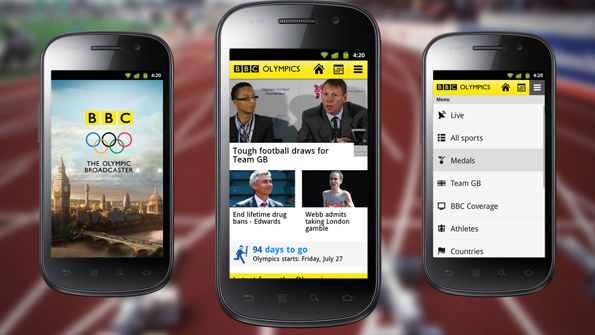
BBC Olympic is the new and first app on Android and iPhone developed by BBC. “The app adds even greater value to the BBC Sport mobile experience, ensuring you never miss a moment of the Games.” Says one general manager from BBC. It offers you direct coverage of the Olympics from the UK, and also allows you to follow all the actions, with daily live text commentaries, breaking news and top stories from all the key events and medal moments. Each of the 36 Olympic sports, every athlete and country has their own page with medal tallies, news stories and key facts. Moreover, you could get minute-by-minute live text commentary during the live action, comprehensive schedule and results service which help you stay in touch with all the Games and results as they happen. In addition, it also has the function of sharing stories, videos and results on your social networks.

However, nothing is perfect! Its IOS app only can run on iPhone, not iPad. Even though its android version is for handsets with OS 2.2 or above, the users need to install flash to be able to watch videos! What a disappointed! If the BBC Sport app wants to become a serious competitor to others then there should be a need for an iPad and non-flash video functionality.

Thursday, July 19, 2012

Best App for Challenging Your Olympic Trivia

London Olympics
I believe everyone worldwide is very excited that The 2012 London Olympics is just around the corner. Are you sure you are ready? Do you know the Motto of the 2012 London, and its unique features? How about the famous competition and top players in swimming? Yes! We still need to review some common sense or amazing facts about Olympics, otherwise someone besides you will poke fun at you while watching games! Here is one wonderful Apple app I suggested to make it up for Olympics.

London 2012 Game
You can imagine that how glad and proud of yourself you are because you know more trivia than your friends. The app “London 2012 Game” collects thousands of events and files covering all the summer Olympic Games for us. In other words, you can challenge thousands of Olympic-focused questions! If you are tired to play this app alone, you could save your best records and share on Facebook to invite your friends compete with you. At the beginning, you will find you know little about Summer Olympics, but one week later, you will become an Olympics encyclopedia.

start
score and share
By the way, if you realize some events and players are interesting and useful for you and your friends and neighbors. How about searching more details such as photos and videos on line, and making PowerPoint presentations according to different themes. That is also a good idea sharing online especially when you convert your PPT to video.

Friday, July 13, 2012

Watch Olympics Live? Just Install two Free Apps for your iPhone and iPad, Android!

无标题文档
As the 2012 Summer Olympics in London is coming soon, maybe you still worry and wonder that how to squeeze time for newest results about  your favourable athletes or watching them competing live, regardless of your boss and your better half. Now NBC help you solve it. NBC launched two free Olympics apps on Thursday that will help users watch every moment in the Games live from their mobile devices. They are NBC Olympics Live Companion and NBC Olympics Live Extra, both free and available now for the iPhone, the iPad, and Android phones/tablets.

NBC Olympics Live
NBC Olympic Live Extra 


With this live app, users of Apple and Android can keep up on every event and view every moment of the Olympic games live for free, wherever you are. You also can replay full event. Its Push Notification will remind you of the upcoming games. Before the games it can relive the Olympics Beijing and provide online listings schedule for you.


 NBC Olympic Companion

NBC OlimpicsA companion app, called simply as “NBC Olympic”, offers you a second screen experience during the on-live broadcasting. Not only can You get real-time results, schedules and medal counts, but also check out additional news and bios of your favourite team and athletes, and join other fans on Facebook, Twitter and Google +.


Can’t wait for London? These two apps is available to free download in App Store and Google Play Store. You will need to have cable, satellite or telco TV subscription for live event coverage. What disappointed is that these apps will leave owners of Windows or Blackberry devices, even Amazon’s Kindle Fire tablets in the cold.
Related Posts Plugin for WordPress, Blogger...