Banner
Showing posts with label Android apps. Show all posts

Sunday, March 31, 2013

Top Free Video Editing Apps for Android!


Nowadays we like to record videos for some funny and romantic moments in our daily life, and the popularity of Android and iOS devices has kept it easier to record a 720P or 1080P HD video with our smartphones and tablets! Meanwhile, before uploading onto YouTube and sharing with friends, some editing for the original videos are often taken to help movies look natural or add our thought! So that’s why the Android video editing apps exist, which allow Android users to edit their videos on the go instead of editing on our computers at home! Here we have picked up best free video editing apps for Android users for reference!

AndroVid Video Trimmer


How do we usually edit our videos, trimming, merging, transcoding, splitting or grabbing video frames? If that, The AndroVid Video Trimmer is such a great and professional editing Android app we should not miss and it actually brings us those common but easy editing features. What’s more, it helps users delete middle parts from a video, allow us to convert video to MP3 and even offers video effects such as Fade in/out and Slow/Fast Motion! In addition, we can save video frames as wallpapers and share video online directly!

AndroMedia Video Editor


As another professional video editing app, AndroMedia Video Editor is designed to be intuitive to use and allow users to edit videos and make movie with several simple clicks! It supports MP4, MOV, MP3, WAV, JPG and PNG file formats, which makes us import more media files for further editing. We can trim and combine videos and audios in two different editors, drag and drop video clips during video editing, apply abundant of effects and transitions like titles, Ken Burn effects and even fade effects. Moreover, it allows exporting movies in 320P, 480P and 720P.

VidTrim – Video Trimmer


As just a free and supported version of VidTrim Pro, the free VidTrim provides us limited editing functions but it is enough to meet basic editing needs. For example, with VidTrim, we also can trim video clips and apply cool video effects like B/W, Negate and SwapUV. However, it still supports converting video files to MP3 audio files and transcoding into MP4 files with customized size! 

Magisto – Magical Video Editor


Magisto provides users a funnier and easier way to edit and share videos with titles, music and effects in several minutes! Users can load videos from video gallery or directly use Magisto as a video camera. In Magisto, we will easily to add music, filters, various effects and fancy transitions. Of course, we can share the edited video to YouTube, Facebook and Twitter!

More tips for Android:

Best Google Reader Alternatives for Android and iOS 
Top 5 Free Siri Alternatives for Android 
Free Download Easter 2013 HD Wallpapers for Android Tablets 
How to Create Windows 8 live Tiles for Android with Best Free Android Apps 
How to View PowerPoint on Android Devices with Five Methods
How to Recover Deleted Files from Android Devices on Mac


Thursday, March 14, 2013

How to Create Windows 8 live Tiles for Android with Best Free Android Apps


Windows Phone 8 Live Tile

Relying on Nokia and HTC, the newly Window Phone 8 OS from Microsoft has been successfully known around the world, but Windows phone still can't make a mark in the smartphone market! Luckily the Windows 8 live Tile has won lots of praise from mobile users! Some Android users want to get such Windows live tiles on their Android devices.

If you are also interested in those Windows 8 Live tiles and bored of Android's user interface, why not creating those live tiles now on your Android phones and tablets? We have rounded up best two free Android apps to help Android user create Windows 8 live tiles on Android. Just take actions to download the following Windows Live Tile apps and beautify your Android!

Tile Launcher

This Android app brings basic smooth Windows live tiles to Android devices, but users get many choices to customize their own live tiles.

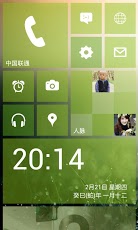
Windows Live Tile on Android - Tile Launcher

Windows Live Tile on Android - Tile Launcher

Feature:

Scrolling – Users can select horizontally or vertically. And it allows you to specify Scroll Settings for scrolling speed, direction, and overscroll effect.

Tile Customization – You can easily select your own title, icon, background colors or images.

Snap Effect – If you need snap effects, it will perform an action, switch screens or open the drawer when overscrolling.

Lock Desktop – It supports to lock your desktop to prevent accidental changes.

Toolbar – this is a unique feature! You are allowed to choose font, colors, icon, and even show a Jellybean-styled date widget!

Note: The Tile Launcher apps are free available on Google Play and runs on Android 4.0 and above! In addition, if you want more special effects for sliding drawer and Tile Appearance, you can purchase its Tile Launcher Pro Key to activate its Pro version.

Launcher 8

It is the most favorable app for creating Windows 8 live tiles. You will be surprised to get more options on tile size, color and more!

Windows Live Tile on Android - Launcher 8

Windows Live Tile on Android - Launcher 8

Feature:

Tile – You can choose different sizes, various colors and even add Android widgets.

Theme and Background - More than one hundred kinds of theme colors can be selected. You can save and restore the theme and set background style.

Screen - You can edit the start screen layout and set the WP8 style lock screen.

Application list - it allows to switch the style of the app list.

More – with permission, it can help you show the shortcuts of Live contact and SMS

Note: The required Android version is 2.2 and up! So it can run on most Android smartphones and devices!

More Android tips:

Top Five Android Office Apps You Shouldn’t Miss!
Top Free PDF Readers Android Users Should Own 
How to Recover Deleted Files from Android Devices on Mac
Android Tips: How to Back up Your Android Devices Data Freely and Safely
Top Free Android Apps You Should Own to Change Your Voice
How to Play Flash on Android 4.1 Jelly Bean


Saturday, March 2, 2013

Adobe Photoshop Touch for Phone Debuts and Stands out from Best Photo Editing Apps

Adobe Photoshop Touch for Phone - Photo Editing App for Android and iOS

Have you ever envied the photo editing ability of your friends and been searching for a powerful photo editing app for your Android Phone or iPhone? Now Adobe brings the core capabilities of its famous designing software Photoshop to your pocket with the Photoshop Touch for Phone.

Adobe Photoshop Touch for Phone - Photo Editing App for Android and iOS

Adobe Photoshop Touch for Phone - Photo Editing App for Android and iOS


As Adobe recently released Photoshop Touch for Android phones and iPhone, it has taken a big step on the road of mobile Photoshop strategy. This phone version of Photoshop makes it possible and easy for users to do a lot to their images, such as scaling, cropping and combining images, even though some of them use it for the first time! Meanwhile, it offers users a number of unique features for Android and iOS smartphones! It allows users to use layers, selection tools, adjustments, and filters from Photoshop to create images! Users can adjust layer order, control individual layer opacity, and move and manipulate layers independently. The popular Scribble Selection feature helps users to pick out part of an image to extract just with fingers. If users still don't satisfy about their creation, they can use the unique Camera fill feature to fill an area on a layer for their creations with their device's camera!

Adobe Photoshop Touch for Phone - Photo Editing App for Android and iOS

Adobe Photoshop Touch for Phone - Photo Editing App for Android and iOS


After some creative editing for images, what will users do next? With the help of Adobe Creative Cloud service, users are allowed to sync those edited projects and continue to edit on tablets or computer! In addition, users can easily share their creations via Facebook, Twitter, email and other applications!

Of course, the Adobe Photoshop Touch for Phone needs $4.99, but it is worthy! If you just need some basic functions from a photo editing app, and don't want to pay any money, you might try Adobe Photoshop Express which is free and meet basic needs! And some other free photo editing apps could also be your best alternatives, like Photo Studio by PicsArt, and Photo Editer by Aviary.

More tips for mobile apps:

Saturday, February 16, 2013

Top 5 Free Siri Alternatives for Android

As a personal voice assistant, Siri for Ios revolutionizes our behaviors! Users can use Siri to send messages, make recommendations, and perform actions when they are driving or busy on other things. Two years has passed since Siri was announced, and it is common to see people controlling their phones with voice. However, Siri has no version for Android platform. Are there any good Siri alternatives for Android devices? Now we will introduce best 5 free Siri alternatives for Android users as reference. They may be not as perfect as users wish, but one of them will meet basic needs as a voice assistant.


Skyvi
Skyvi can help users do most things like Siri. Users can text/call friends, find places and get directions, voice search, and even tweet or update Facebook with voice. Meanwhile, it will tell jokes and play music for users. With Skyvi, users will be surprised by its convenience and allow hands and eyes free.


Speaktoit Assistant
This Siri alternative could finish basic tasks for users, like answering questions, finding information, and connecting you with various web services. Of course, it is easy to get maps, search for news and images, convert currency and measurements, and send email. In addition, it is available to change the assistant's appearance from brunette girl, handsome agent to old professor.


Iris
Iris is a little different from other Siri alternatives. It not only helps text/call someone, search nearby and get news, not also can play music and video, make movie recommendations and answer questions on science, culture and history, and more. What's more, if works with the app Friday, users will get more amazing functions.


Maluuba
it is also one of useful personal assistants. Similar to other Siri alternatives, users can control their phones with voice to search for restaurants, ask general questions, get directions and even shop online. It is allowed to do more for user's daily life. Just speak to Maluuba to set reminders, create alarms and even connect to Facebook, Twitter and Foursquare.


Robin
Robin can't do all things like Siri, but it is such a useful eyes-free assistant to do better on some tasks. Ask for local places, users can get directions but also info about parking & traffic. It is easy to know the nearby gas stations and prices. Basic tasks such as reminders & alarms, text messages & jokes are simple to control by voice.

Wednesday, January 23, 2013

Top Free PDF Readers Android Users Should Own

PDF files are important for some people and they are easily viewed, managed and shared nowadays! But to keep up with the development of mobile technology, more mobile devices users desire to manage their PDF files with more functions on the go. As a result, lots of Android PDF readers support users to view, mark, take notes and even sign on PDF files. So here we pick up some great PDF readers with different features and unique advantages for Android users. In addition, users can view PDF with some Android Office apps by downing their free PDF plugin.

Adobe Reader (Free)

Adobe PDF Reader

No doubt, Adobe Reader is always the first choice to view all kinds of PDF files no matter on PC, devices of iOS and Android. It is absolutely fantastic! Same as its PC version, users can easily access, manage and share PDF types, including PDF Portfolios, password-protected documents, fillable forms, and Adobe LiveCycle® rights-managed PDF. Now, users can share files across all of your desktop and mobile devices with Acrobat.com and automatically save changes back to the cloud. In addition, one of its new features allows users to electronically sign documents!

qPDF Viewer (Free)

qPDF Viewer

It is another free great PDF reader! Similar to Adobe Reader, it supports basic PDF viewing functions like viewing, marking and signature! But it brings high fidelity rendering of PDF documents and adds new viewing mode “Text reflow” for PDF. And it can works with Gmail, Google Drive, Dropbox, Box, and corporate email apps

Radaee PDF Reader(Free)

Radaee PDF Reader

One advantage of Radaee PDF Reader is its speed! It has fast rendering speed without preloading cache. Of course, it supports zooming, searching, highlight and outline viewing.

ezPDF Reader ($0.99)

ezPDF reader

It is a powerful reader specializing on multimedia PDF files. Not only it can allow users view and manage PDF files as other readers, but also it supports playing multimedia files embedded into PDF and its voice reading feature can read loudly the documents to you with automatic page-turning function. What's more, documents can be customized to view as on PC with flipping DUAL PAGE viewing and users can access to Google Drive. Dropbox with the free "ezPDF Reader G-Drive Plugin" App.

Moon+ Reader ($4.99)

Moon+ Reader

It is a full-function book reader that supports epub, PDF, mobi, chm, cbr, cbz, umd, fb2, txt, html, rar, zip or OPDS formats. As for viewing and managing PDF, it allows highlight, annotation and even handwriting. There are also Night mode and Dual-page mode support, and even 6 additional PDF themes available for users. What should be mentioned is that users can listen to PDF Voice reading by just shaking the phone. Now it has been localized in 40 languages.

More tips for apps:
Top Free Android Apps You Should Own to Change Your Voice
Top Five Android Office Apps You Shouldn’t Miss!
Top Browsers Supporting Flash for iOS 6 Devices 
Top Free Calling iOS Apps to Help You Call for Free with iPhone, iPod touch and iPad 


Monday, January 21, 2013

Top Free Android Apps You Should Own to Change Your Voice

Do you want to give a big surprise to your family members and friends with a strange and cute voice? At some parties, you may have considered making horrible voice to play tricks on your friends and try to fool them. Now the Android Changing-voice apps will help you realize those ideas! The following apps are all free and help you record your voice easily and make lots of effects for your voice!

Simple Voice Changer
simple voice changer

This app is simple to use for anyone! It not only allows to record voices of yourself and your friends with your Android devices, but also helps you change the voice with funny effects, such as Evil, Alien, Chipmunk, Robot, Slow, Helium, Deep, Reverse, Talk into Fan, Robot Mouse and Echo effect. In addition, you can share the effects with friends via e-mail/instant messenger, and even save and store them as a favorite for later playback or a ringtone!


Ultra Voice Changer
ultra voice changer

The Ultra Voice Changer records and changes your voice with more different details and effects. When recording, the audio rates for recording includes: 44100 stereo, 22050 stereo, 11025 stereo, 44100 mono, 22050 mono, 11025 mono, 48000 stereo, 48000 mono, 8000 mono. So you can select one recording mode to work best for your devices and make normal voice effects! Of course, email and save the voice effects are also available for users!

Best Voice Changer
best voice changer

This app is a little different from above apps. All basic functions of changing-voice apps are supported, for example, record and change your voice to popular effects like cat, robot, echo and even women and men’s voice. What’s more, you can add background sounds like airport and crowd, which will make your voice sound as if you were on a plane.


Change my Voice
change your voice

It is one of good and simple voice apps that record and change your voice. Voice effects like chorus, echo, chipmunk, cat, robot, child, megaphone, several women’s and men’s voices are all access to users. By the way, you even can change your speech speed.

More Android apps for you:
Top Five Android Office Apps You Shouldn’t Miss! 
Top Popular Android Games Apps in 2012
How to Install Google Play Store on Amazon Kindle Fire HD 7'' 
School Supplies: Top Back-To-School Mobile Apps


Friday, January 11, 2013

Google Play Tips: Tips before Buying An App and Requesting Refund!

For Android users, searching for apps in Google Play may be a common thing they do in daily life! Sometime you can’t decide whether buying a new app or not, and unluckily the newly installed apps couldn’t satisfy them and bring troubles to your Android devices! To save unnecessary money, you need to know what to do before purchasing an app and even how to returning the app and request refund from Google Play or Developers!

Google Play

What you should do before buying an app from Google Play?

Focusing on features between free and paid versions

This is a most important part before buy an app, but you should pay much attention on those key features of the app, especially different features between free and paid version. you may think an app is relatively cheap and is worthy to buy. However, for some free apps, you'll find that the only difference is that they are ad-supported. Upgrading to full version will remove the ads and nothing else. In addition, some apps with full version will provide some key and extra features, but actually the free version has met user’s need!

Similar apps from different developers

If you are a loyal fan of some developers, it is not necessary to comparing similar apps from different developers since you believe in those developers and are familiar with their user interface! But, if money and factions are the only things you care about, you should compare those apps from different developers, and you will find cheaper and useful app!

Check comments from review, feedback and social media options

If you are still not sure whether to buy an app, why not search and get more comments from other old users. You can just read the users review or feedback on Google play. In addition, if it is still a little expensive for you, you also can ask options from social media users by means of just input the app’s name into Facebook or Twitter.

Sales promotion!

You may be so lucky to find the sales promotion of this app in Google Play. However, we all know that Amazon has its own Android app market, and you will find more promotions from the same developers. By the way, some sites such as FreeAppADay and AppShopper also run free giveaway for some apps every day!

Returning apps and get your money back

A full refund within 15 minutes from the time of download

Some Android users may not know that Google Play allows users uninstall and get a full refund within 15 minutes from the time of download. During the 15 minute return period, users can find a 15 minutes refund window in the Google Play Store app from devices. The other method is to log onto your account from web browser, select My Order & Settings in the bottom of the page and choose Report a problem by closing to the app you want to return.

Refund from developers after the 15 minutes ends

When you scroll down the page of the app in Google Play, you will find the detailed information about the developer, like email address, phone number and social networking account. Just contact the developer and ask refund. What’s should mentioned is that not all refund reasons work and they still have the right of final explanation whether approving your refund or not. So before contacting them, you should make sure you got an eligible enough issue for the refund, like freezing your device after installing!

The above tips are some practical but personal options, and some users may have known those tips early. Good luck for you and may you save more money! 

Thursday, December 20, 2012

Top Popular Android Games Apps in 2012

The year 2012 comes to an end soon! Android devices have overwhelmingly occupied most part of global market this year! In 2012, the latest Android flagships like Samsung Galaxy S3, Galaxy Note II, Nexus 7 and Nexus 4 get much of the credit! Of course, it also makes Android users cheerful that some great apps and games come into the Google Play in 2012. Here we share with Android users our point of view about some top selling Android games apps in 2012.

Dead Trigger

It is not a movie at all and it is a real game of the year 2012! Players need to smash hordes of bloodthirsty zombies in full 3D characters and environments! What players should do is to load their guns and save the Earth!


The Bard’s Tale

It is a funny 3D epic role-playing game and is full of adventure! Acting as the Bard, players should summon characters to join themselves in battle, defeat more than 50 enemy types and explore a vast world with over 150 unique items of weaponry, armor, instruments! In 2012, Android users should take this adventure!


Temple Run

If users hate shooting and killing games, this adventure game is worth to play! It is simple but very addicting of the year 2012! Even though players are always running or escaping, but they need to give their whole attention to run and react sensitively. In the meantime, players have to swipe to turn, jump and slide to avoid obstacles, collect coins and buy power ups!


Angry Birds Star wars HD

It is another new story about Angry Birds in 2012. This time players will join an epic adventure with the Angry Birds to fight with Pigs!


Asphalt 7: Heat

Racing games are always important roles among all kinds of games! This car-racing game is the latest and fastest edition of the famed Asphalt series in 2012! Players will drive 60 different cars from the world’s most prestigious manufacturers, like Ferrari and Lamborghini! And players will race on 15 tracks set in real cities around the world to challenge against the best players in the world!


Where’s My Water?

It is one of the year’s greatest Brain and Puzzle games, and developed by Google Play’s top Developer, Disney! Following Where’s my Perry, Where’s My Water? is another new challenging physics-based puzzler. Players should be clever and watch out for algae, toxic ooze, triggers, and traps in three stories!


Cut the Rope

It is another puzzle and physics-based game we can’t miss in 2012! What players mainly do is to cut the rope and feed candy to little monster Om Nom! But there are 300 levels and more waiting for players to challenge. Moreover, some great awards are offered for the winners!


UNO

Everyone knows this classic world-famous card games! In 2012, it sells well and is popular among Android users! Players don’t have to call together family members or friends to play with real UNO cards! They can play this classic card game with friends and family on their Android phone!

Android game - UNO


Friday, December 14, 2012

Top Five Android Office Apps You Shouldn’t Miss!

The smartphones nowadays are so powerful that users can almost do anything they want! Android devices have been spread all around the world. Android users have been used to doing daily thing and dealing with working stuffs with their Android smarphones and tablets! However, it is all known that Microsoft Office doesn't develop its mobile version for Android OS. But if users want to read and even edit some emergency Office documents at the office or on the go, what should they do?

That is why some Android Office apps are so popular! Here we are going to share the top five Android Office apps for Android users. Most Office apps can allow you freely reading Office documents, but need your money if you want to edit and manage with more features. Even though the free Google Docs is also good enough, it has to rely on the web-based Google Drive services, which means that you can't take it as a native app and have to create and edit local docs online!

In addition, if you want to deal with all kinds of your office docs as you do with Microsoft on PC, those Office apps can't make a hundred percent pledge for you. For example, Sometimes you want to show your PowerPoint presentation smoothly with all original effects and animation, it could be a great alternative for you to convert PowerPoint to video for your Android devices. After conversion, you even can play the PowerPoint video on any devices even TV, and share online easily!

PowerPoint to Video Converter - Convert PowerPoint to video

It is a great alternative of Microsoft Office for your Android devices! Microsoft Office documents, spreadsheets, and presentations and PDF files all can be viewed and edited online and offline. What's more, it will help you access not only local saved files but also Google Drive or other cloud storage accounts like Dropbox, Box, Evernote. That means you can get your work done on the go.

Android office app - quickoffice


Android users may find out that ThinkFree has been preloaded on their devices. It is another professional Office tool for Android devices. So you also can view, edit and create documents,sheets, presentation as well as PDF files. And, its user interface is more simple and intuitive optimized for your smartphone and tablet. Sharing office files onto online storage service such as ThinkFree Online, Box.net, Google Drive is available for users, too! It is allowed to insert video to PowerPoint and add memo and highlight on PDF files!

Android office app - Thinkfree


Documents to Go also supports PowerPoint, Word, Excel and the usual file types on your Android devices, and imports files for you from Google Docs. This app offers you rich formatting features when you are editing your office documents. In addition, it can sync your files with PC.

Android office app - Documents to go


This Office app is a little more powerful! Same to others, it alows to view edit and share Word, Excel and PowerPoint files on the go. But also you can print documents with Google Cloud Print or previously installed third party print solution. Moreover, it supports converting your text documents to PDF files and checking- correcting the spelling of text documents (based on Google ICS spell-check). In addition, expect for usual file types, users can also deal with Outlook EML files, and the ZIP files.
Android office app - Officesuit

Even though you have installed above Office apps, you still can’t miss Kingsoft Office because it is the only free office apps with rich features. It is free for users to view, edit and share all kinds of office documents, it is mobile version from its desktop Kingsoft Office.the abilities like Printing and spell-checking are also available. At the same time, the documents can be encrypted!

Android office app - Kingsoft Office

Tuesday, December 11, 2012

Top Free Android Apps for Christmas Gifts and Shopping

The Christmas and New Year 2013 is closer and closer! It is time to prepare for Christmas decoration and Christmas gifts now! If you ever took online shopping on Cyber Monday, you must enjoy the convenience and speed of online shopping. So your Christmas shopping should begin now with the help of mobile devices. It is a good idea to keep some Christmas shopping apps in your mobile devices in order to help you plan Christmas shopping list and snag your favorite Holiday Christmas deals.

Here we pick up some best free Christmas shopping apps for Android users. Those Shopping apps will help you make your Christmas shopping list and plan, keep track of some Christmas gifts and even get latest and best Christmas deals from Retailer Giants, just on your handy Android devices! They are free available in Google Play.

Apps for managing Christmas gifts and shopping list

Free Christmas list

It owns most features you want for your Christmas list and help you manage your shopping list easily. For example, Gift tracking, gift cost tracking and even cost summary. Of course, you may have to pay to update Pro version if you want to email and share your list.

Xmas Organizer

The Xmas Organizer will be your great tool for Christmas shopping. First of all, it keeps track of your ideas and gifts and the persons by using pictures from camera or gallery. It will be aware of your bought or not-bought budgets. What’s more, you can use the list to see where to buy and the app will remind you of the days to Christmas!

Tools for helping you shop smarter

RedLaser Barcode & QR Scanner
 
 
Have you ever regret that you bought a more expensive budget when you get home from mall or shopping center? When you are going to shop with your Christmas Gifts list, it is better to own this kind of app. With RedLaser, you can scan all major retail barcodes and QR codes. And then it searches millions of products from thousands of online and local retailers to help you find out the best prices and even coupons and deals. If you are still not satisfied, it also suggests alternatives or related products for you. In addition, it even can scan to store your local cards and share with family and friends!

Dealnews App

The deals app is so popular especially on holidays shopping season. It will bring you daily deals and coupon by keyword, category, store. if you can't buy it right now, it is available to save the deal for the future. Of course, you are allowed to share those latest deals and coupons with your friends. The newest version will help create personal deal alerts and coupon Code Tracking!

Discount Calculator
 
If you want to avoid troubles of calculating the real price and comparing the discounts, the Discount Calculator will be installed into your Android devices. With this calculator, you just need a few drags and presses and you will quickly know the real price, discount and even how much you can save!    

Retailer giants official apps

It is all believed that every Android users own one or more retailers apps on their Android devices! All those retailor apps can help user keep track of tons of products and deals from retailors and even shop and pay immediately! So here we are not going to have a introduction of them! We just make out a list as reference for Android users!

Those popular Retailor official apps are Amazon Mobile, The Walmart app, Official eBay Android, Best Buy and the Target and so on!


Related Posts Plugin for WordPress, Blogger...