Banner
Showing posts with label top apps. Show all posts

Saturday, February 16, 2013

Top 5 Free Siri Alternatives for Android

As a personal voice assistant, Siri for Ios revolutionizes our behaviors! Users can use Siri to send messages, make recommendations, and perform actions when they are driving or busy on other things. Two years has passed since Siri was announced, and it is common to see people controlling their phones with voice. However, Siri has no version for Android platform. Are there any good Siri alternatives for Android devices? Now we will introduce best 5 free Siri alternatives for Android users as reference. They may be not as perfect as users wish, but one of them will meet basic needs as a voice assistant.


Skyvi
Skyvi can help users do most things like Siri. Users can text/call friends, find places and get directions, voice search, and even tweet or update Facebook with voice. Meanwhile, it will tell jokes and play music for users. With Skyvi, users will be surprised by its convenience and allow hands and eyes free.


Speaktoit Assistant
This Siri alternative could finish basic tasks for users, like answering questions, finding information, and connecting you with various web services. Of course, it is easy to get maps, search for news and images, convert currency and measurements, and send email. In addition, it is available to change the assistant's appearance from brunette girl, handsome agent to old professor.


Iris
Iris is a little different from other Siri alternatives. It not only helps text/call someone, search nearby and get news, not also can play music and video, make movie recommendations and answer questions on science, culture and history, and more. What's more, if works with the app Friday, users will get more amazing functions.


Maluuba
it is also one of useful personal assistants. Similar to other Siri alternatives, users can control their phones with voice to search for restaurants, ask general questions, get directions and even shop online. It is allowed to do more for user's daily life. Just speak to Maluuba to set reminders, create alarms and even connect to Facebook, Twitter and Foursquare.


Robin
Robin can't do all things like Siri, but it is such a useful eyes-free assistant to do better on some tasks. Ask for local places, users can get directions but also info about parking & traffic. It is easy to know the nearby gas stations and prices. Basic tasks such as reminders & alarms, text messages & jokes are simple to control by voice.

Thursday, December 20, 2012

Top Popular Android Games Apps in 2012

The year 2012 comes to an end soon! Android devices have overwhelmingly occupied most part of global market this year! In 2012, the latest Android flagships like Samsung Galaxy S3, Galaxy Note II, Nexus 7 and Nexus 4 get much of the credit! Of course, it also makes Android users cheerful that some great apps and games come into the Google Play in 2012. Here we share with Android users our point of view about some top selling Android games apps in 2012.

Dead Trigger

It is not a movie at all and it is a real game of the year 2012! Players need to smash hordes of bloodthirsty zombies in full 3D characters and environments! What players should do is to load their guns and save the Earth!


The Bard’s Tale

It is a funny 3D epic role-playing game and is full of adventure! Acting as the Bard, players should summon characters to join themselves in battle, defeat more than 50 enemy types and explore a vast world with over 150 unique items of weaponry, armor, instruments! In 2012, Android users should take this adventure!


Temple Run

If users hate shooting and killing games, this adventure game is worth to play! It is simple but very addicting of the year 2012! Even though players are always running or escaping, but they need to give their whole attention to run and react sensitively. In the meantime, players have to swipe to turn, jump and slide to avoid obstacles, collect coins and buy power ups!


Angry Birds Star wars HD

It is another new story about Angry Birds in 2012. This time players will join an epic adventure with the Angry Birds to fight with Pigs!


Asphalt 7: Heat

Racing games are always important roles among all kinds of games! This car-racing game is the latest and fastest edition of the famed Asphalt series in 2012! Players will drive 60 different cars from the world’s most prestigious manufacturers, like Ferrari and Lamborghini! And players will race on 15 tracks set in real cities around the world to challenge against the best players in the world!


Where’s My Water?

It is one of the year’s greatest Brain and Puzzle games, and developed by Google Play’s top Developer, Disney! Following Where’s my Perry, Where’s My Water? is another new challenging physics-based puzzler. Players should be clever and watch out for algae, toxic ooze, triggers, and traps in three stories!


Cut the Rope

It is another puzzle and physics-based game we can’t miss in 2012! What players mainly do is to cut the rope and feed candy to little monster Om Nom! But there are 300 levels and more waiting for players to challenge. Moreover, some great awards are offered for the winners!


UNO

Everyone knows this classic world-famous card games! In 2012, it sells well and is popular among Android users! Players don’t have to call together family members or friends to play with real UNO cards! They can play this classic card game with friends and family on their Android phone!

Android game - UNO


Friday, December 14, 2012

Top Five Android Office Apps You Shouldn’t Miss!

The smartphones nowadays are so powerful that users can almost do anything they want! Android devices have been spread all around the world. Android users have been used to doing daily thing and dealing with working stuffs with their Android smarphones and tablets! However, it is all known that Microsoft Office doesn't develop its mobile version for Android OS. But if users want to read and even edit some emergency Office documents at the office or on the go, what should they do?

That is why some Android Office apps are so popular! Here we are going to share the top five Android Office apps for Android users. Most Office apps can allow you freely reading Office documents, but need your money if you want to edit and manage with more features. Even though the free Google Docs is also good enough, it has to rely on the web-based Google Drive services, which means that you can't take it as a native app and have to create and edit local docs online!

In addition, if you want to deal with all kinds of your office docs as you do with Microsoft on PC, those Office apps can't make a hundred percent pledge for you. For example, Sometimes you want to show your PowerPoint presentation smoothly with all original effects and animation, it could be a great alternative for you to convert PowerPoint to video for your Android devices. After conversion, you even can play the PowerPoint video on any devices even TV, and share online easily!

PowerPoint to Video Converter - Convert PowerPoint to video

It is a great alternative of Microsoft Office for your Android devices! Microsoft Office documents, spreadsheets, and presentations and PDF files all can be viewed and edited online and offline. What's more, it will help you access not only local saved files but also Google Drive or other cloud storage accounts like Dropbox, Box, Evernote. That means you can get your work done on the go.

Android office app - quickoffice


Android users may find out that ThinkFree has been preloaded on their devices. It is another professional Office tool for Android devices. So you also can view, edit and create documents,sheets, presentation as well as PDF files. And, its user interface is more simple and intuitive optimized for your smartphone and tablet. Sharing office files onto online storage service such as ThinkFree Online, Box.net, Google Drive is available for users, too! It is allowed to insert video to PowerPoint and add memo and highlight on PDF files!

Android office app - Thinkfree


Documents to Go also supports PowerPoint, Word, Excel and the usual file types on your Android devices, and imports files for you from Google Docs. This app offers you rich formatting features when you are editing your office documents. In addition, it can sync your files with PC.

Android office app - Documents to go


This Office app is a little more powerful! Same to others, it alows to view edit and share Word, Excel and PowerPoint files on the go. But also you can print documents with Google Cloud Print or previously installed third party print solution. Moreover, it supports converting your text documents to PDF files and checking- correcting the spelling of text documents (based on Google ICS spell-check). In addition, expect for usual file types, users can also deal with Outlook EML files, and the ZIP files.
Android office app - Officesuit

Even though you have installed above Office apps, you still can’t miss Kingsoft Office because it is the only free office apps with rich features. It is free for users to view, edit and share all kinds of office documents, it is mobile version from its desktop Kingsoft Office.the abilities like Printing and spell-checking are also available. At the same time, the documents can be encrypted!

Android office app - Kingsoft Office

Sunday, December 9, 2012

Top Free Christmas Tree Apps for iPhone and iPad

The Christmas 2012 is on the way! Every family is busy to decorate their house and Christmas tree! How about you? Have you bought and decorated your christmas tree? Do you want to make your Christmas Tree decoration special? The following Christmas Tree apps are all free, including Christmas tree decoration ideas and games. Download them and you will get some creative ideas from them!

123 Decorate Your Christmas Tree

With this Christmas Tree app, you will get 11 kinds of artistically designed decorations (with bells and glass balls, and candles do glow) and 6 different trees to decorate. You will be free enough and create your Christmas Tree on your iPhone and iPad. It is simple, and after decoration you can share with your friends via email and facebook!

123 Decorate Your Christmas Tree


Christmas Tree

If you prefer more ornaments to decorate Christmas Tree, the iPhone and iPad app developed by Sticky Ice Games will be your best choice! You can decorate your tree with a huge assortment of ornaments, such as glass balls, trinkets, toppers and even gifts. What’s more, you could put the tree in the environment with animated snowfall, lights and sound effects! You even can choose 6 festive backgrounds or customize your personal background from your photo album! In addition, after you have enjoyed your Christmas tree, you can export the tree to photo and email to your family and friends!

Christmas Tree

Christmas Tree 3D

This Christmas Tree app will be a visually pleasing experience for you because of 3D interface, 3D background and variety of 3D ornaments! It is easy to use! Use swipes to navigate through pages of ornaments and lights, and taps to place them on and off. Dimmer can be used to turn down the lighting in the room to enjoy the animated lights! And, what’s more you can do is that you are also allowed to take a snapshot of your tree, save it in your photo album, and send it to your friends and family!

Christmas Tree 3D

oChristmas Tree

if you just wanna Christmas tree app game to play with your family, it could be one of your choices! This app provides dozens of ornaments with different themes for kids or adults! Just shake your iPhone and it will reset your tree! Of course, save your tree and share with family and friends are available!

oChristmas Tree

Christmas Tree Decorating for Kids (By Happy - Touch)

Are you looking for a Christmas games app for your kids? Why not considering this Christmas tree app? It is fun and also improves your kids’ fine motor skills! Your children can decorate a beautiful tree as he wants, with stars, ornaments and balls!

  Christmas Tree Decorating for Kids


Best Free iPhone and iPad Christmas Apps for Your Kids


Friday, November 16, 2012

Top 5 Free Thanksgiving Recipes Apps for iPhone and iPad

The Thanksgiving Day 2012 is coming soon. It is a great time for family together and delicious Thanksgiving Dinner. However, it may also be the busiest time for home cooks and it is difficult to save time and make delicious food at the same time. So it is better to plan and prepare the Thanksgiving recipes and related food in advance. To help you prepare the Thanksgiving dinner easier and make creative food, we suggest the following thanksgiving apps as for your reference. These top recipes apps can allow you to plan, search and even shop for the delicious dinner easily before the Thanksgiving night. With these cooking apps, you can prepare the recipes and food on the way or during the time waiting in line.

1.    Thanksgiving Menu Maker from Fine Cooking
Whether it is your first time to cook for the Thanksgiving Day, it is a good idea to free download this cooking app to help you. You will get a customized holiday menu from more than 75 of our all-time favorite Thanksgiving recipes, involving those recipes about Starters, Main Dishes, Sides, and Dessert.Even there are lots of delicious ways to cook turkeys. What’s more, after your menu is created, you will get the shopping list for every ingredient you need the Thanksgiving recipes and you can shop with iPad as you go. In addition, its Schedule planner will remind you of what needs to be done during cooking!

hanksgiving Menu Maker from Fine Cooking - thanksgiving recipes app


2.    Chow Thanksgiving Dinner Coach
The Chow app is a simple-to-use recipe app to offer you the easiest and most delicious traditional Thanksgiving recipes. The recipes app not only helps you make great recipes easily and fast, but also creates a step-by-step timeline and guide to tell you what to do through the entire Thanksgiving day. By the way, a shopping list is available to help your shopping quickly in the supermarket.

Chow Thanksgiving Dinner Coach - thanksgiving app

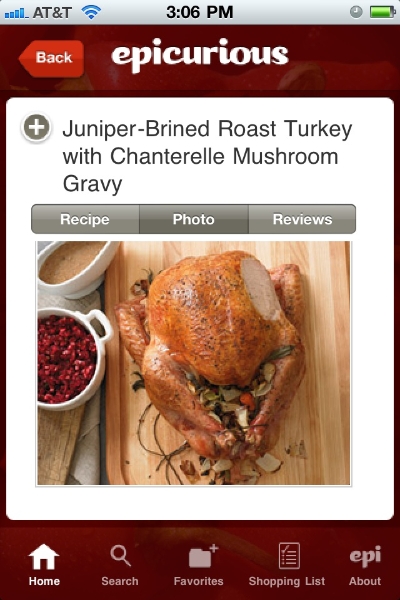
3.    Epicurious Recipes & Shopping List
If you still can’t find the satisfied Thanksgiving recipes or need more choices. This Epicurious app will be a good alternative to get more creative ideas for a delicious dinner. The recipes are mostly from the award-winning food site Epicurious.com. So you can search more than 30,000 delicious, professionally created recipes from renowned chefs worldwide for your favourite Thanksgiving food. Now its new version has allowed you to sync your Favorites recipes list on Epicurious.com to get more reviews, or email to your friends!

Epicurious Recipes & Shopping List - thanksgiving app


4.    BeTheChef! Creative Cooking Ideas!
If you are bored of those cooking times and instructions of thousands of recipes, this app may solve your problems. The app won’t tell you directly the recipes, but suggests you some amazing cooking ideas, such as combining some ingredients to make a delicious dish you never taste before! You will get inspired to know what to do with the ingredients and cook creative and healthily for your Thanksgiving dinner.

BeTheChef - thanksgiving app for iPad and iPhone

5.    Whole Foods Market Recipes

With this recipes app, you can get awesome Thanksgiving recipes, too. But it help you search and make your recipes differently and remove your worries about heath problems. You can search recipes by ingredients and dietary preferences such as gluten-free, low fat, and vegetarian/vegan. You not only find out the finest natural and organic foods, but also know nutritional information and cooking instructions of your Thanksgiving recipes. Of course, you are allowed to make your Shopping list with exact quantities automatically.

What should be mentioned is that its store locator can help you find out the stores near you, get links to their website for specials of natural and organic foods on sale!

Whole Foods Market Recipes - thanksgiving app for iPad and iPhone

More apps for iPad and iPhone:
Top iPhone and iPad Traveling apps We Can't Miss
NBA 2012-2013 - Best Free NBA Apps for iPhone and iPad

Friday, November 9, 2012

iPhone and iPad Tips: Top Free Must-have Utilities for iPhone 5 and iPad mini


Life of every iPhone and iPad user has been influenced by those iOS devices more or less! The App Store offer users much fun and convenience with its apps! In order to have fun with or take full use of iPhone and iPad, we should own some necessary or useful app or software for our iOS devices! However, it is difficult to find out these kinds of utilities especially those free ones online! Now we have rounded up some awesome and simple-to-use free utilities for iPhone and iPad from the Internet for your reference, wishing to help you save time and trouble!

Find My iPhone

All users of iPhone, iPad and iPod touch should install it into their devices! As we all know, it is developed and suggested by Apple. All of us are likely to lose our iPhone or iPad. If it happened, we would want to know where they are and were certainly worried about the safety of our data. So this is what Find My iPhone are designed for. We can find out where our iPhone or iPad are on the map by installing this app in another iOS device. What’s more, we can remotely lock our lost devices or even delete our data.

Find my iPhone - utility of  iPhone and iPad


Any smartphone and tablet swallow a great amount of network data, and so do iPhone and iPad! Naturally, we should get something to help us to find out free Wi-Fi Internet hotspots. This Free Wi-Fi Finder can search out Over 145,000 Free locations using your iPhone’s GPS. We can search by “near me”, geographic regions and location type (Cafe, Library, etc.). Of course, it is free version; another paid version will offer us more amazing functions!

free Wi-Fi Finder


Different from Android devices, our iOS devices can’t show as a readable disk on computer. If we want to transfer files between iPhone, iPad and PC, we have to use iTunes. However, our disappointment to iTunes is that we are not allowed to transfer movies, music and photos from iPhone to computer, especially those music and photos downloaded from website or friends! So that is why we mention Leawo iTransfer here. The iTransfer is a great alternative to iTunes and can help us to make up the disadvantage of iTunes. It can transfer not only movies, music and photos but also PDF files, apps and eBooks between iOS devices and PC! 

In addition, great news is that the iTransfer is free as a giveaway on November 12, 2012 limited! Even though the developer often carries free giveaway activities for Leawo iTransfer, this time is different before and anyone can get great discount on other iPhone and iPad converters from now on to November 22.

Leawo iTransfer - free data transfering tool


If we save some important information that we don’t want others to have access to in our iPhone, iPad and Mac, This kind of app is what we should own! Keeper stores our passwords and private information with a simple but military-grade encryption way. We can back up online and Syncs to All Your Devices. With Keeper, we can access our private info anywhere and anytime and securely protect important data from Hackers and rogue programs! Of course, you may find more paid safety app on the market!

Keeper - free app for iPhone and iPad

Battery Doctor

The battery life is one of key features that we concern for mobile smart devices! Any new battery can only power our iPhone, iPad or other devices in 2 years at most. Apart from knowing some tips to saving battery life, it is great choice to install Battery Doctor for our iPhone and iPad. It can help us get real-time power consumption rankings, shut down those applications which consume phone power and battery life will be more lasting.

free app - battery life

The Weather Channel

In last blog we suggest the Living Earth among top traveling apps. Similar to Living Earth, the Weather Channel can offer us real-time weather information worldwide. Based on the support of 200+ meteorologists, along with its patented ultra-local TruPoint(sm) weather technology, it provides us with full screen, customizable weather maps and allows us to plan our day, week, or even the next hour with the great weather tool!


Thursday, November 8, 2012

Top iPhone and iPad Traveling apps We Can't Miss


Traveling means a great holiday for those who love nature and life, but is ordinary for those businessmen! Whatever, travel involves traffic, weather, accommodation, daily diet and even scene sighting! Nowadays there are a lot of mobile apps available for our phones and tablets. Some of great apps actually help much people save time and trouble in those places far from home! Today let’s share some great and necessary iOS traveling apps for those iPhone 5 and iPad mini users out out of home!
 
Flight+

This iOS app can help you track all flights worldwide in real-time and display them all in one unique interface. You can track detailed real-time flight info,no matter departure and arrival time, information about gate,airline,airport and aircraft. What’ more, its alert can help remember every flight you concern. In other words, with the help of this app, you won’t miss any your flight  and sometimes receive your friends at the airport in time! It has free and paid version for iPhone and iPad! Its paid version will certainly give you more wonderful services!

Living Earth- clock&Weather


It is a most beautiful and stunning clock and weather apps! it features HD live 3D simulation of our planet. You can get real-time global weather map, forecasts and world clock for cities around the world, and track hurricanes and tropical storms. It is optimized for the Retina display of iPhone and iPad 4. Last year, it was ever rated as a Top 10 iPhone and iPad app in 2011 by Apple New York Times. during our holiday or business travel, it would be better to install Living Earth into iPhone, iPad even iPod touch!

iPhone app - Living Earth
  
Wi-Fi Finder

when you travel, how to quickly and easily find Wi-Fi will be an important issues since International data rates can be crushing out of your country. Wi-Fi Finder can track over 200,000 both free and paid hotspots in 135 countries, and tell you exactly where the closest Wi-Fi hotspot is and how to get there!

Currency Converter

We need local money when traveling, so it is necessary to know the currency rate! This iPhone and iPad app converts exchange rates for over 180 currencies and 4 metals in a simple interface! And the rates are daily updated based on information supplied by leading market data contributors. But it is more important to know details where you can see buy and sell rates for both currencies. The app also can help you solve this problem!

currency converter

SpeechTrans French English Translator with Voice Recognition

It is impossible to know all main languages worldwide. But we can communicate with those people whose mother language is different from yours with the help of translator app! We all know the free Google translator but most of time it is full of grammar mistakes! This French English Translator can translate out what you need! It supports Text to Speech translations and record function for your voice! BTW, it is fast and accurate!

Translator - iPhone app

Google Earth

Wherever we go, it is better to own a navigation app or device in hand in case of losing way!Undoubted, Google Earth is the most amazing Nav app worldwide. Based on its up-to-date Map data , you can browse layers including roads, borders, places, photos and more in almost any place around the world! Its new service “tour guide” even helps you easily discover exciting new places to explore.

Google earth

Hotels.com

Everyone on the way need accommodation! If you don’t camp and have no friends in a new place, finding a hotel will be a key thing when you are traveling. This iPhone and iPad app is developed by Hotels.com. With this app, you can search and book 150,000+ hotels throughout 200 countries, and even get lots of last minute deals in the new feature ”Tonight’s Local Deals”. In addition, all bookings made on the Hotels.com app will count towards your WelcomeRewards account, and you will be rewarded for one free night after booking 10!

Hotels.com - iPhone and iPad app

Yelp

If you go to a new city even in your home city, you sometime feel trouble to find some restaurants especially those popular and special food! Now with Yelp, you can easily search out places to eat,drink, shop and rest! The new version of Yelp not only help find nearby bars, restaurants, cafes and more, but also allow you to find great Deals, browse a restaurant's menu along with photos and reviews, and even make reservations! It is a necessary partner for your iPhone and iPad when we travel out of home!


Urbanspoon

This is another great app searching for food! Just shake your iPhone and the Urbanspoon slot machine will suggest a restaurant and you can follow GPS to get there! Of course, like Yelp, you can find out great new places to eat. And make a RESERVATION.

Yelp - iPhone app


Of course, these are basic and necessary apps for users of iOS devices around the world. When you travel to some place, you still can find out more local and detailed apps for your iPhone and iPad!
Related Posts Plugin for WordPress, Blogger...